 Screen Online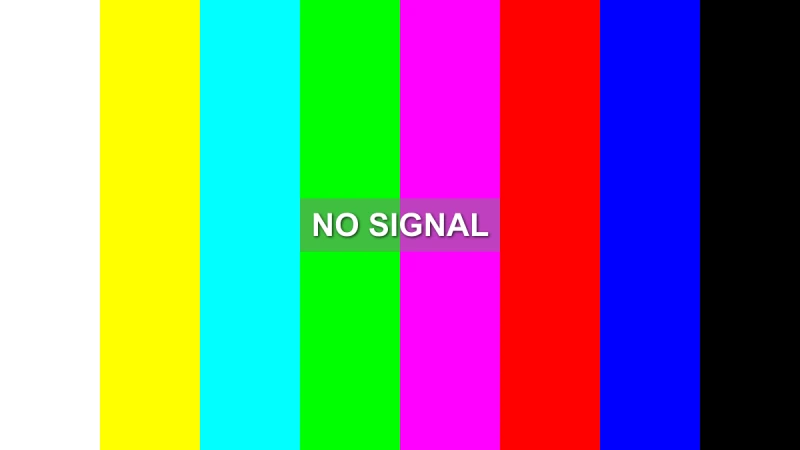
The no signal screen is one of the most recognizable visual symbols in television history. That distinctive combination of color bars and "NO SIGNAL" text has appeared on screens worldwide, marking moments of technical transition, broadcast interruptions, and nostalgic memories. But what exactly is a no signal screensaver, and why has this specific test pattern become so iconic?
In this comprehensive guide, we'll explore the complete story behind no signal screensavers - from their origins in broadcast engineering to their modern applications in streaming, content creation, and digital art.
🎯 Quick Answer: What is a No Signal Screensaver?
A no signal screensaver (also called a TV test pattern or color bars screen) is a visual display consisting of:
- 8 vertical color bars: White, Yellow, Cyan, Green, Magenta, Red, Blue, Black
- "NO SIGNAL" text: Centered overlay indicating loss of broadcast signal
- Dark background: Standard black television screen
This pattern serves multiple purposes: technical calibration for broadcast engineers, signal loss indication for viewers, and cultural symbolism representing communication interruption or technical difficulties.
📺 The Fascinating History of TV Test Patterns
Origins in Broadcast Engineering (1950s-1960s)
TV test patterns originated from practical broadcast engineering needs in the early days of television:
| Era | Development | Purpose |
|---|---|---|
| 1950s | First SMPTE color bars designed | Standardize color calibration across TV stations |
| 1960s | Modified SMPTE bars popularized | Enable easier visual adjustment by engineers |
| 1970s | Test patterns become viewer-familiar | Regular display during off-air hours |
| 1980s | Digital broadcast standards | Conversion from analog to digital signal processing |
The Technical Purpose: Broadcast engineers used these patterns to verify:
- Color accuracy and calibration across different television sets
- Signal strength and quality during transmission
- Display alignment and geometry
- Brightness and contrast settings
Cultural Transformation: From Utility to Icon
By the 1970s-1980s, no signal screens had evolved from internal technical tools into cultural touchstones:
- 1970s: Test patterns regularly shown after sign-off in North America, becoming bedtime television for many children
- 1980s: "NO SIGNAL" displays marked the transition to cable television
- 1990s: Commercial breaks and technical difficulties adopted variations of this visual
- 2000s: Internet streaming platforms revived the aesthetic for loading screens and transitions
- 2010s-Present: Content creators use no signal screens for retro aesthetics, nostalgia marketing, and artistic expression
Today, the no signal pattern represents much more than broadcast engineering - it's a visual shorthand for:
- Nostalgia and retro aesthetics
- Technical communication failure
- Transition between content
- Alert or warning signaling
🎨 Understanding the 8-Color Bar Pattern
Decoding Each Color Bar
The standard SMPTE color bar pattern follows this sequence (left to right):
-
White Bar (#FFFFFF): Pure white reference point
- Used to adjust maximum brightness
- Ensures proper white balance
-
Yellow Bar (#FFFF00): Primary subtractive color
- Tests yellow channel response
- Verifies color mixing accuracy
-
Cyan Bar (#00FFFF): Blue-green combination
- Primary additive color reference
- Tests cyan channel calibration
-
Green Bar (#00FF00): Pure green primary
- Most sensitive color to human eye
- Critical for color accuracy
-
Magenta Bar (#FF00FF): Red-blue combination
- Tests color mixing consistency
- Verifies magenta reproduction
-
Red Bar (#FF0000): Pure red primary
- Tests red channel response
- Verifies warm color reproduction
-
Blue Bar (#0000FF): Pure blue primary
- Tests blue channel calibration
- Verifies cool color reproduction
-
Black Bar (#000000): Pure black reference
- Used to adjust minimum brightness
- Ensures proper contrast settings
The Science Behind Color Testing
Modern displays still rely on these color bars for hardware calibration:
Technical Calibration Process:
1. Display color bars pattern
2. Adjust hue (color tint) to match bar transitions
3. Adjust saturation to achieve pure colors
4. Adjust brightness using white/black bars
5. Verify all 8 colors display correctly
6. Test gradients between color zones
🎬 Modern Applications: From Nostalgia to Professional Tools
1. Streaming & Content Creation
Twitch streamers and YouTube creators use no signal screens for:
- "BRB" (Be Right Back) transitions: Maintain audience engagement during breaks
- Technical difficulty coverage: Professional appearance during setup issues
- Retro gaming aesthetics: Nostalgic appeal for retro game content
- Loading screens: Familiar visual while content buffers
- Use authentic 8-color bars for maximum recognizability
- Keep "NO SIGNAL" text visible but readable
- Maintain aspect ratio (16:9 standard)
- Consider adding subtle animation for longer displays
- Include stream branding subtly if appropriate
2. Broadcast Training & Education
Broadcast engineering programs utilize no signal screens for:
- Signal processing education
- Display calibration training
- Transmission troubleshooting
- Quality control verification
3. Film & Video Production
Filmmakers and video editors incorporate test patterns for:
- Transition scenes between narrative segments
- Period-accurate visuals in historical films
- Technical malfunction storytelling
- Retro aesthetics in modern productions
4. Digital Art & Cultural Commentary
Digital artists explore no signal screens as:
- Conceptual art about communication breakdown
- Media consumption criticism
- Technological dependence themes
- Gallery installations and exhibits
🔧 Technical Specifications & Standards
Broadcast Standards
Different broadcast regions use varying color bar specifications:
| Standard | Region | Colors | Use Case |
|---|---|---|---|
| SMPTE | North America | 7-color standard | Standard broadcast calibration |
| EBU | Europe | 7-color variant | European broadcasting |
| EIA | Industrial | 10-color enhanced | Advanced calibration |
Resolution & Display Requirements
Modern digital no signal screens should support:
Minimum Display Requirements:
  - Resolution: 1920x1080 (Full HD) or higher
  - Aspect Ratio: 16:9 standard
  - Color Depth: 8-bit per channel (24-bit total)
  - Refresh Rate: 60Hz minimum

Recommended Professional Specs:
  - Resolution: 3840x2160 (4K UHD)
  - Color Space: Rec. 709 or DCI-P3
  - Color Depth: 10-bit per channel (30-bit total)
  - Refresh Rate: 60Hz or 120Hz
📊 Comparison: Test Patterns vs. Static Screens
Understanding the difference between no signal screens and other screen displays:
| Feature | No Signal Screen | Static Screen | Loading Screen |
|---|---|---|---|
| Purpose | Signal loss indication | Pure color display | Progress indication |
| Colors | 8-color bars | Single color | Blue system UI |
| Text Overlay | "NO SIGNAL" | None | "Loading..." / spinner |
| Use Case | Broadcast / streaming | Testing / meditation | File/program loading |
| Cultural Symbol | High recognition | Minimal | Modern computing |
💡 Why No Signal Screens Are Still Relevant
Technical Relevance
Even in our streaming-dominated era, no signal screens remain crucial for:
- Display Calibration: Hardware manufacturers use these patterns to calibrate new displays before shipping
- Broadcast Quality Control: Television stations verify signal quality
- Professional Monitoring: Content creators ensure color accuracy
- Troubleshooting: Diagnosing display issues and signal problems
Cultural Relevance
Beyond technical utility, no signal screens hold cultural significance:
- Generational Memory: Multiple generations recognize this pattern
- Nostalgia Marketing: Brands use retro aesthetics to evoke emotional connection
- Visual Shorthand: Instant recognition conveys "technical issue" or "transition"
- Artistic Expression: Contemporary artists reinterpret this familiar visual
🎯 Practical Uses: When to Use No Signal Screens
Professional Applications
✅ Use a no signal screen when:
- Conducting display calibration tests
- Training broadcast engineers
- Demonstrating technical difficulties in videos
- Creating period-accurate television scenes
- Designing transitions for streaming content
- Need recognizable "technical issue" visual shorthand
Educational Use Cases
✅ Educational institutions use them for:
- Teaching signal processing concepts
- Demonstrating broadcast history
- Technical training exercises
- Media literacy education
- Engineering curriculum
Entertainment & Nostalgia
✅ Content creators leverage them for:
- Retro gaming aesthetics
- Nostalgia-driven content
- Technical difficulty humor
- Transition effects
- Loading screens with personality
🔗 Related Tools & Resources
After exploring no signal screens, you might want to:
- Test your display calibration - Use our authentic TV test pattern
- Explore more screensavers - Browse our collection of 40+ display tools
- Check broadcast history - Read about television technology evolution
- Try retro screensavers - Experience nostalgic screen displays
🎉 Conclusion: More Than Just Colors on a Screen
The no signal screensaver transcends its original technical purpose to become:
- A Broadcast Engineering Tool: Essential for display calibration and quality control
- A Cultural Icon: Recognizable across generations worldwide
- A Professional Resource: Still used in modern broadcasting, streaming, and content creation
- An Artistic Medium: Explored by digital artists and cultural commentators
From 1950s broadcast studios to 2020s streaming platforms, the no signal screen has maintained relevance by serving both technical necessity and cultural memory. Whether you're a broadcast engineer, content creator, educator, or curious viewer, understanding this iconic pattern provides insight into the intersection of technology, media, and culture.
Ready to experience an authentic no signal screen? Try our professional TV test pattern tool featuring industry-standard 8-color bars and customizable display options. Perfect for calibration, testing, retro aesthetics, or simply exploring this fascinating piece of broadcast history.
Discover more screen tools and learn about display technology in our screen testing collection and educational blog.